
Onvelop3.8.2 - Google Play
You'll be able to see results in few seconds.
Publisher Description
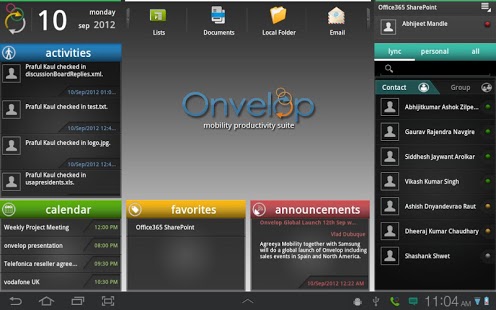
Onvelop brings the power of mobility to your enterprise. If you work with Microsoft Office 365, SharePoint and Lync, then Onvelop is the tool for you to access them from your mobile devices. Whether you are traveling, working in the field, from home or any other situation, Onvelop allows you to stay connected with your colleagues through Instant Messaging, VoIP Calls and Conferencing. Access your documents from SharePoint, stay up-to-date on Announcements, Wikis, Lists, Discussion Boards, Calendars and Tasks – all of this from your mobile device. Onvelop goes beyond just document access, by integrating collaboration and communication functions, such as conducting document reviews with your colleagues.
KEY FEATURES: -
1. Main features of Lync available that includes peer to peer call, call conferencing, video calling, integration with skype and Lyncmeet.
2. Document management both offline and online available for SharePoint.
3. Access to subsites, calendars, wiki, tasks and all other features of SharePoint.
4. Unified collaboration and communication features - new patented user experience
a) Onvelop Review: View documents and be on call on Lync at the same time
b) Onvelop Schedule a Review: Setup calendar request with documents attached from SharePoint.
5. Web based admin dashboard and Online support available for users.
PRICING: -
This is a 30 day free trial and the user can subscribe to a monthly fees of $3.99 per month. A discounted yearly pack is also available.
CHARACTERISTICS:
(If you are a company admin for SharePoint or Lync, please read here - contact support@onvelop.com for any questions)
• Web based dashboard available to manage and control Onvelop devices (MAM). Onvelop also supports remote wipe-out enterprise data from any lost or stolen device via MDM.
Onvelop does not require the installation of software at your enterprise back-end. It seamlessly integrates with existing Microsoft SharePoint and Microsoft Lync infrastructure.
• Office 365 Support
Onvelop works out of the box with Microsoft Office 365. All you need to do is enter your Office 365 login credentials and you are good to go.
• Robust Security and Management
Onvelop keeps your enterprise data secure by implementing encryption on the device (AES-256 and SHA-256) and secure connections to the enterprise back-end (SSL/TLS). Onvelop can be managed with enterprise Mobile Device Managers (MDM). Additionally,
SUPPORT AND REQUIREMENTS:
• Android Tablets running Android 3.x (Honeycomb) or later
• Android SmartPhones running Android 4.0.x (Ice Cream Sandwich) or later, WVGA or greater
• For other mobile device platforms supported, please visit www.onvelop.com.
• Must have an Microsoft Office 365 account. For use within enterprises that have on-premise installations of Microsoft SharePoint and Lync, please send us a request to support@onvelop.com or visit www.onvelop.com .
Note: Onvelop works best with Samsung tablets and smartphones
About Onvelop
The company that develops Onvelop is AgreeYa Mobility. The latest version released by its developer is 3.8.2.
To install Onvelop on your Android device, just click the green Continue To App button above to start the installation process. The app is listed on our website since 2014-10-17 and was downloaded 0 times. We have already checked if the download link is safe, however for your own protection we recommend that you scan the downloaded app with your antivirus. Your antivirus may detect the Onvelop as malware as malware if the download link to com.agreeya.sharepro is broken.
How to install Onvelop on your Android device:
- Click on the Continue To App button on our website. This will redirect you to Google Play.
- Once the Onvelop is shown in the Google Play listing of your Android device, you can start its download and installation. Tap on the Install button located below the search bar and to the right of the app icon.
- A pop-up window with the permissions required by Onvelop will be shown. Click on Accept to continue the process.
- Onvelop will be downloaded onto your device, displaying a progress. Once the download completes, the installation will start and you'll get a notification after the installation is finished.
Program Details
System requirements
Download information
Pricing
Version History
version 3.8.2
posted on 2014-10-17
version 2.4.1
posted on 2013-06-08
Several fixes and updates
Disclaimer
Official Google Play Link
We do not host Onvelop on our servers. We did not scan it for viruses, adware, spyware or other type of malware. This app is hosted by Google and passed their terms and conditions to be listed there. We recommend caution when installing it.
The Google Play link for Onvelop is provided to you by apps112.com without any warranties, representations or guarantees of any kind, so access it at your own risk.
If you have questions regarding this particular app contact the publisher directly. For questions about the functionalities of apps112.com contact us.
